
Applies to: closed beta
Reporting bugs
How to send a bug report that we can act on: the in-game report, what to write, and how to attach a clip.
Updated October 26, 2026
Finding bugs is why the beta exists. A good report gets a bug fixed quickly. First check Known issues: if it is listed, we already know.
Report from the game
- Press F9 while you are in the world, or open Options → Account → Report bug. The window is called Report a bug.
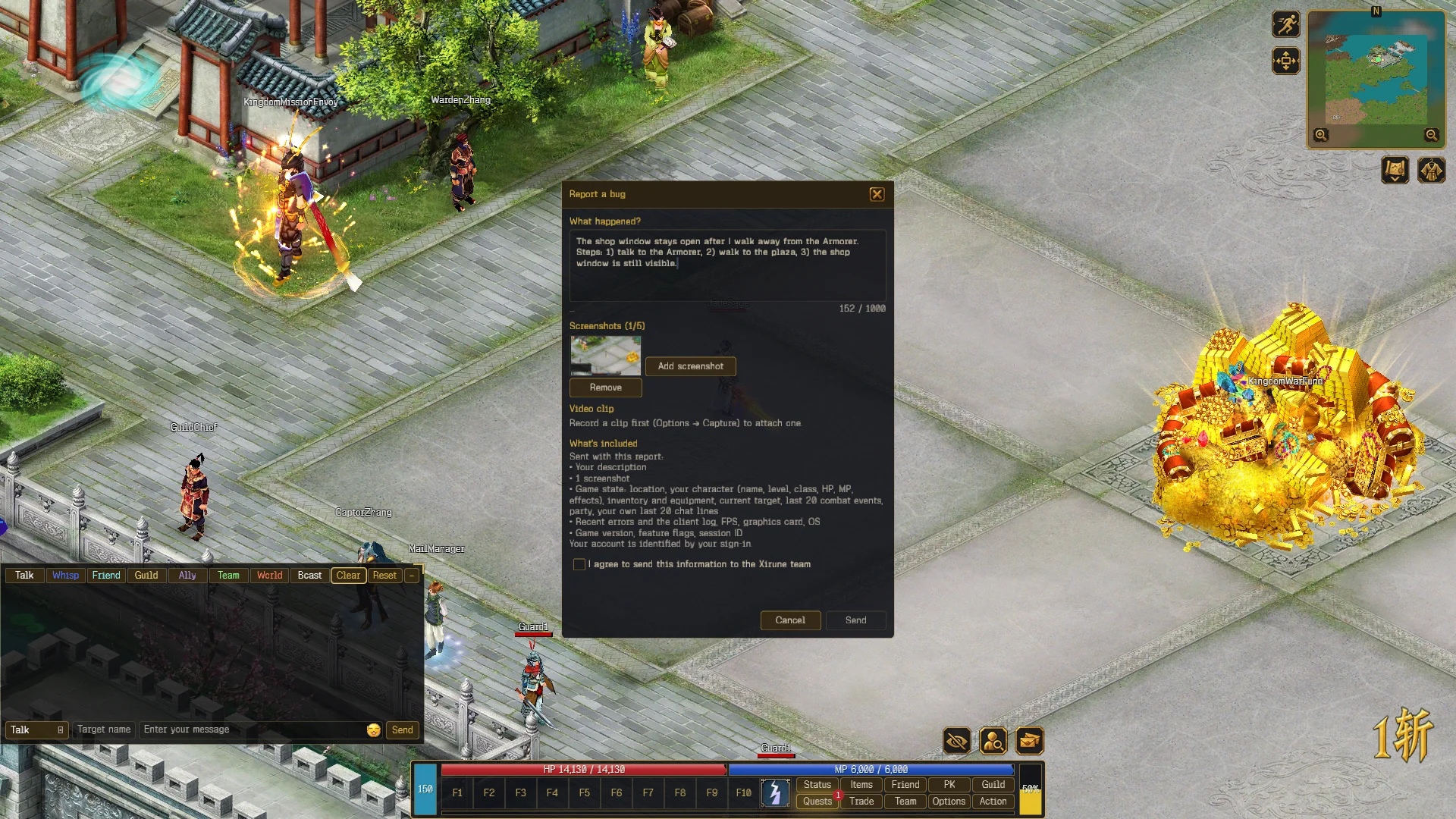
- Under What happened?, write what went wrong. You have 1,000 characters.
- The report opens with a screenshot of your game already attached. Add screenshot adds more, up to five in total.
- Optional: attach a clip (see below).
- Read What’s included, tick I agree to send this information to the Xirune team, and press Send. Ctrl + Enter in the description box also sends.
You can keep playing while the report uploads. The window shows how many of your 50 reports for the day are left.
What’s included: your description, the screenshots and clip, your location and character (name, level, class, HP, MP, effects), inventory and equipment, your target, the last 20 combat events, your party, your own last 20 chat lines, recent errors and the client log, FPS, graphics card, OS, the game version, feature flags and a session ID. Your account is identified by your sign-in.
What to write
- What happened. One or two sentences.
- What you expected.
- How to repeat it. Short steps. “Every time” or “once” helps.
- When. Date, rough time and your time zone, if it was a while ago.
The report already carries your character and map, so you do not need to repeat them.
Example:
Soul Shackle: my Taoist ghost still walks after I’m shackled. Expected: can’t move. Steps: died to a Ninja, got shackled, clicked the ground.
Attach a clip
A clip shows what words cannot. Record it before you open the report.
- Open Options → Capture and press Record video, or press Ctrl + Alt + R. Press Stop and save video, or the same keys again, to stop.
- Reproduce the bug.
- Open the report and press Attach last clip. Without a recording the window says Record a clip first (Options → Capture) to attach one.
Your last recording is compressed to fit 50 MiB and 60 seconds, so keep clips short. If a clip is longer, the report keeps the last minute and says (last minute).
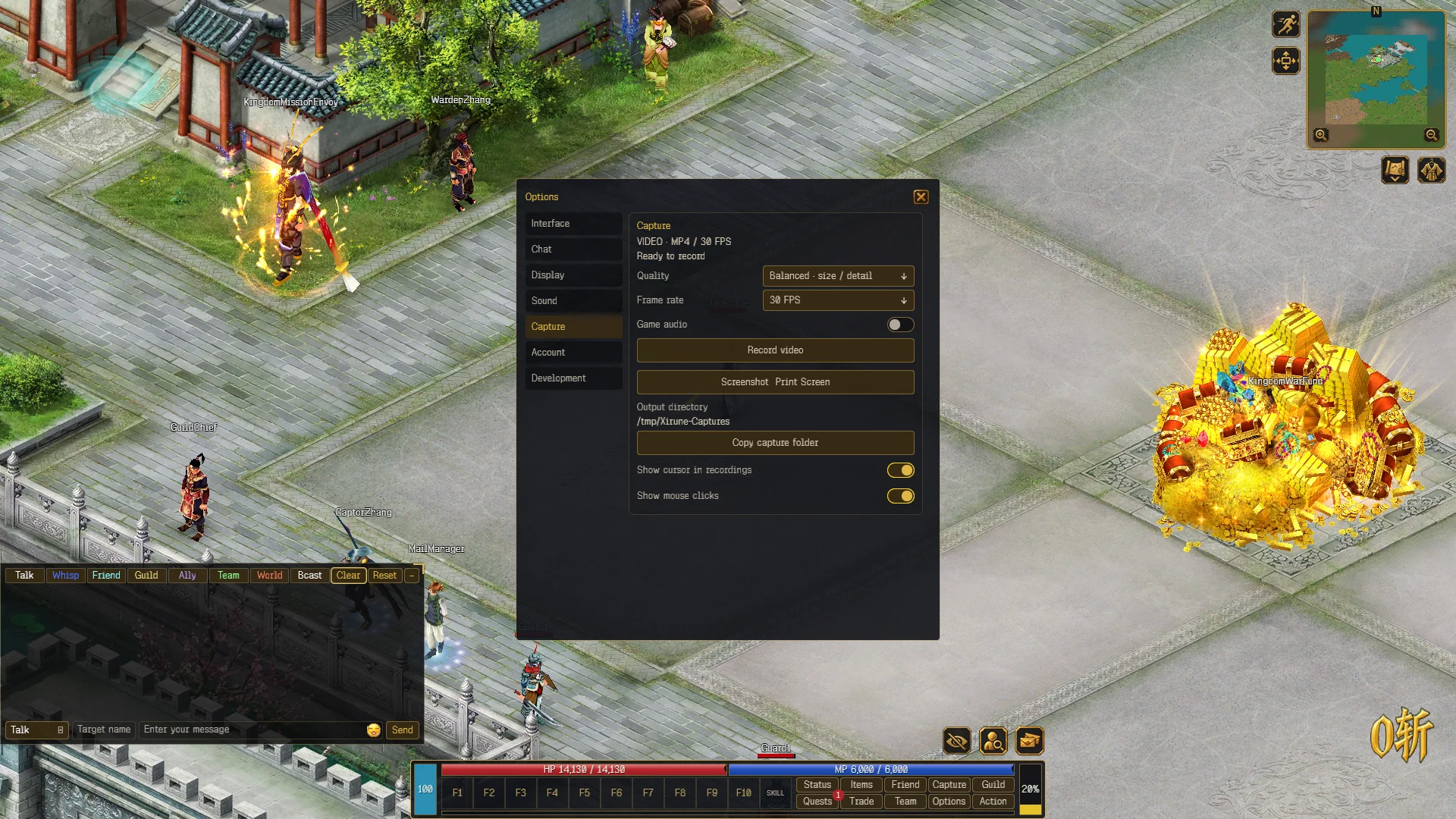
Ctrl + Alt + S or Print Screen takes a screenshot. Screenshots and videos are saved in the Pictures\Xirune folder in your user folder. Options → Capture shows the exact folder as Output directory and has Copy capture folder. You can change the hotkeys in Options → Display → Hotkeys.
Other tips
- One bug per report.
- Never post your password, login links or invite email. We never ask for them.
- If the game cannot connect, check the launcher: EU-1 may be restarting for a patch.
- Launcher or installer problems: post on Discord with the launcher log. Choose Open logs folder from the launcher menu or from the Xirune icon in the notification area.
- Want to talk about a bug with others? Join Discord.
What happens next
We read every report. We may ask follow-up questions, and fixes are listed in the patch notes. Thank you for taking the time.