
Applies to: closed beta
Chat, friends and teams
Talk, whisper, team and world chat, the Messenger, the friends list, and forming a team.
Updated November 3, 2026
Xirune has four social tools: the chat panel, the Messenger, the Friend window and the Team window.
Chat
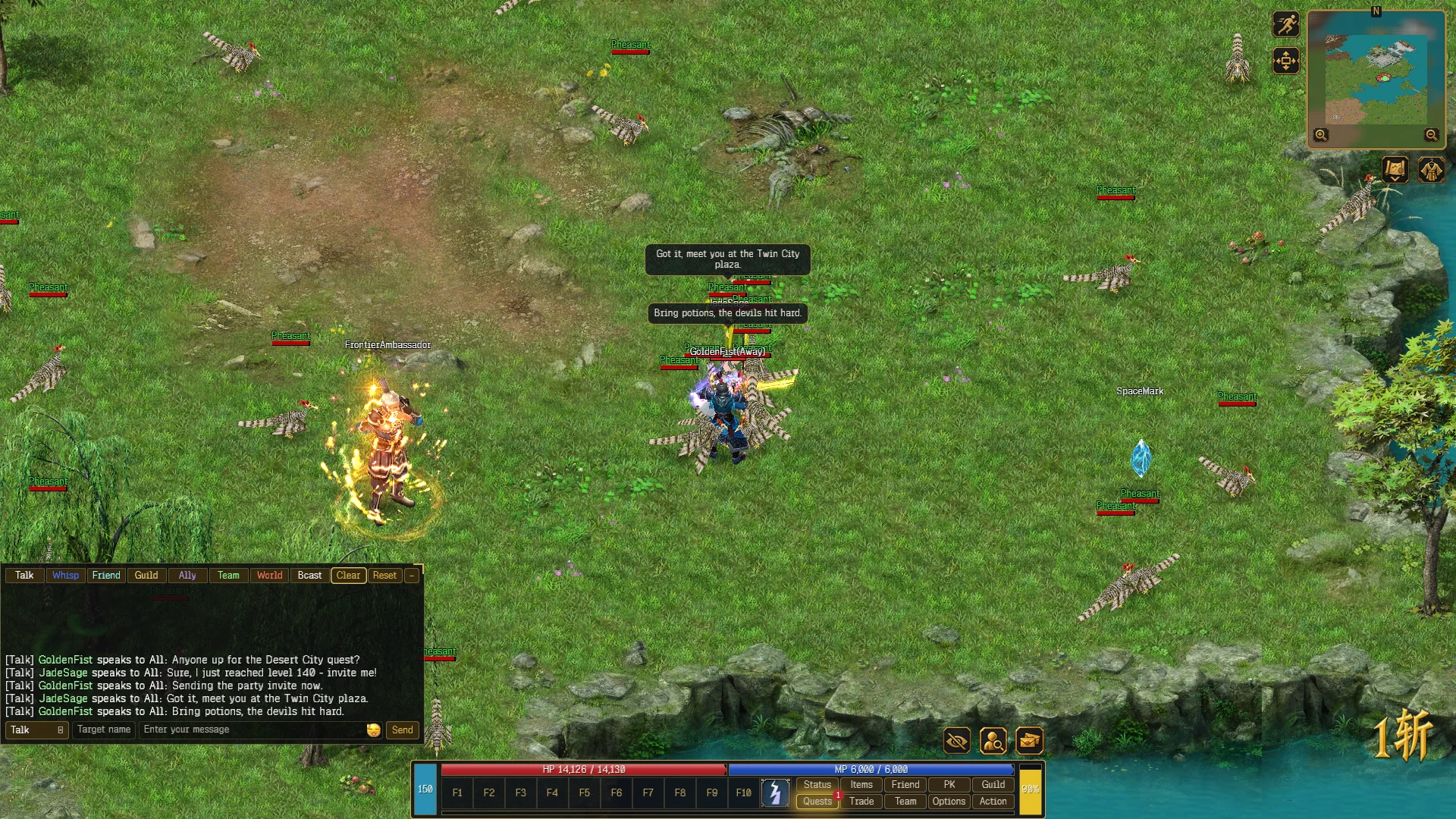
The chat panel has a row of channel chips (Talk, Whisp, Friend, Guild, Ally, Team, World, Bcast), a Clear button, and the composer at the bottom: a channel picker, a Target name field, the message box (Enter your message) and Send.
The chips switch what you see. Click one to hide or show that channel’s lines.
Sending a message
- Press Enter with the game window focused, or click the message box.
- Pick a channel with the channel picker.
- Type, then press Enter or click Send.
- Press Esc to leave the box without sending.
| Channel | Who hears it |
|---|---|
| Talk | Players near you on the map |
| Whisper | One player. Type their name in Target name |
| Team | Your team |
| World | Everyone online. You can send one World message every 15 seconds |
| Broadcast | Everyone online, as a banner. Level 50 or higher, one every 15 seconds |
A message is at most 255 bytes. Plain Latin text uses one byte per letter; other scripts use more. Lines starting with !, @ or / are not accepted as chat.
Sending on Friend, Guild or Ally is not possible yet. The client says so: Friend chat is not available yet., Guild chat is not available yet. or Ally chat is not available yet.
Shortcuts:
- Shift + left-click a player to start a whisper to them.
- Ctrl + left-click a bag item or an equipped item to put a link to it in your message. Anyone can left-click the link in chat to inspect the item. Right-click a link to copy it into your own message.
- Ctrl + Alt + C clears the visible chat.
- Options → Chat has Transparent chat, Broadcast messages and Message colors.
Messenger
Every whisper you send or get lands in the Messenger. Open it with the Msg icon on the HUD. The icon shows how many whispers you have not read.
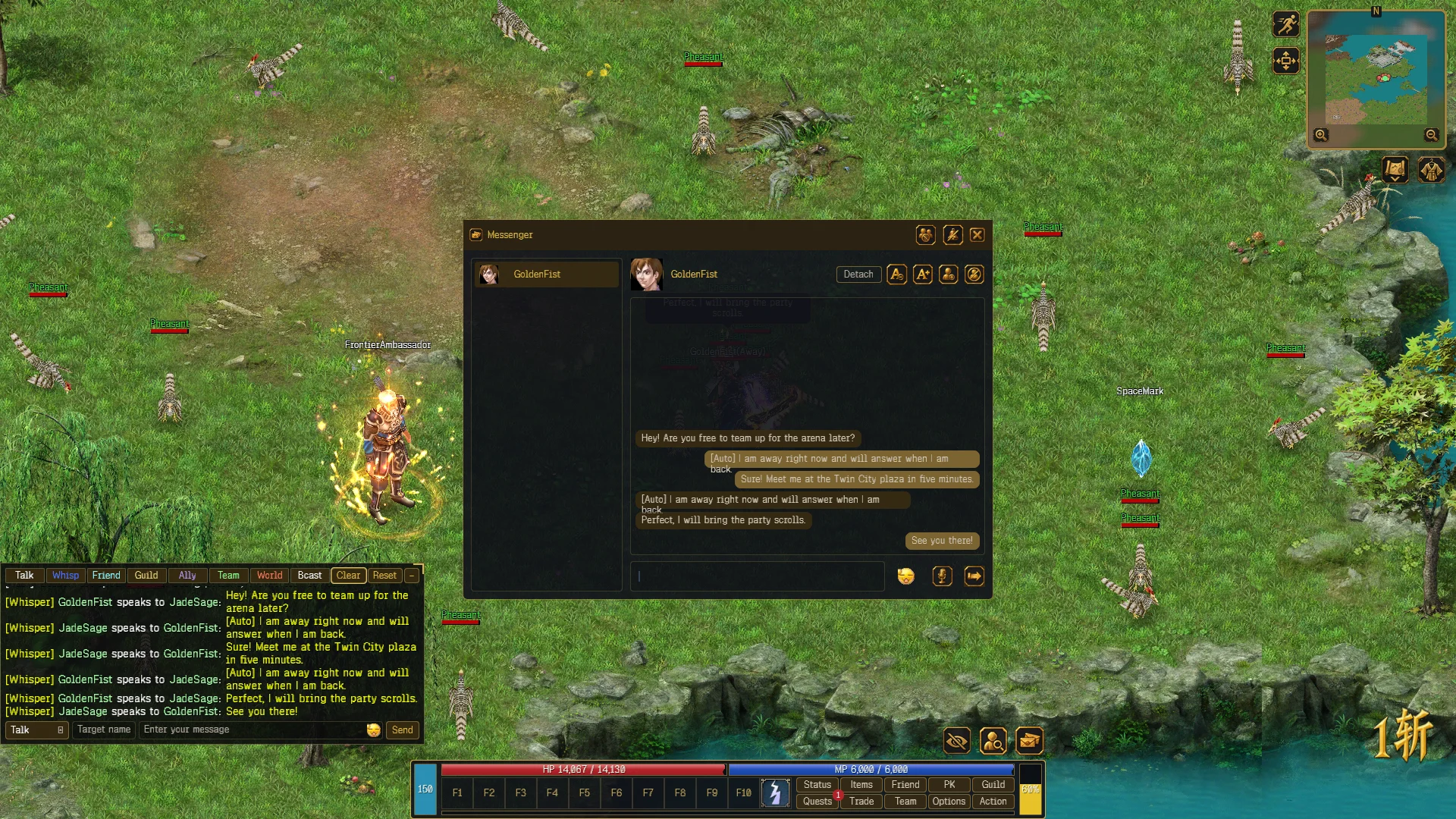
- The left list has one row per conversation. Select a row to read it and type a reply. Press Send. A whisper is at most 255 bytes.
- A new whisper pops up as a toast for a few seconds, up to three at a time. Press R to open the conversation of the last player who whispered you, as long as you are not typing in a box.
- Right-click a conversation to Detach it into its own window. You can keep up to six open.
- Add friend sends a friend request to the other player.
- Block stops their whispers from reaching you. Blocked lists the players you blocked, and Unblock lets them through again.
- Do not disturb hides the toasts. Whispers still arrive and still count as unread.
- If you stand idle for three minutes, the first whisper from each player gets an automatic reply: [Auto] I am away right now and will answer when I am back.
- Item links in whispers show the item.
You cannot whisper yourself. The Messenger keeps the last 50 lines of each conversation until you leave the game.
Move or resize the toast in Edit HUD.
Friends
Open the Friend window with the Friend button or F. It has two tabs, Friends and Enemies. Online players are listed first, then by name. A list holds up to 50 friends and 20 enemies.
| To do this | Do this |
|---|---|
| Add a friend | Click Add friend, then left-click the player in the world. They get a request window |
| Accept a request | Accept in the request window. Both of you are added |
| Remove a friend | Select them, click Remove. Both of you are removed |
| Whisper a friend | Double-click their row |
| Clear an enemy | Enemies tab, select them, click Forgive |
Press Esc or right-click to cancel picking a player.
Teams
Open the Team window with the Team button. A team holds up to five players and shows N / 5 members.
Forming a team
- Create makes you the captain.
- Join a captain lets you left-click a captain in the world to ask to join. The captain can accept only while Allow joining is on.
- As captain, Invite lets you left-click a player to invite them. They get an accept window.
Press Esc or right-click to cancel picking a player.
Captain controls
| Control | What it does |
|---|---|
| Invite | Pick a player to invite. Disabled when the team is full |
| Kick | Remove the selected member. Select a member first |
| Dismiss | You leave. The member who joined earliest becomes captain. The team stays together |
| Allow joining | Lets players ask to join you |
| Share money loot | Shares money drops with the team |
| Share item loot | Shares item drops with the team |
Members see Captain and the captain’s name, and a Leave team button. When the last member leaves, the team ends. There is no way to hand over leadership other than Dismiss.
Seeing teammates
Each member has a portrait with name, level, HP bar, and a star on the captain. The minimap marks the captain when they are on your map. Hover a portrait of a teammate who is not visible to you for half a second to see where they are.